Common order mistakes
Most early losses on a new platform are not bad market calls. They are bad clicks. CME’s course mentions that brokers add safeguards, such as limits on contracts per order, two-step order placement, and price checks, specifically to reduce trader error. This last Order Filler lesson walks through the classic mistakes so you recognize them before they cost you.
1. The wrong month
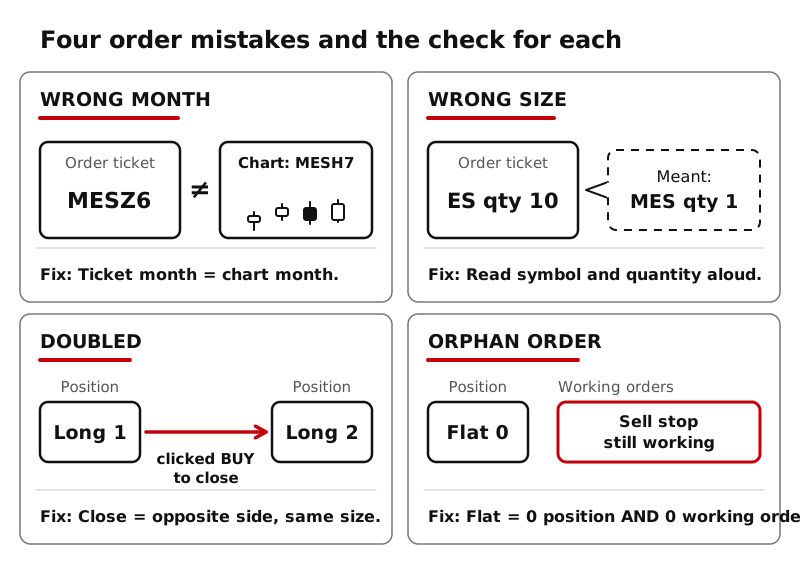
You learned in Runner Lesson 9 that ES, NQ, MES, and MNQ have several contract months listed at once, and that traders move to the next one as expiration nears. The mistake: your chart shows one month and your order ticket is set to another. Maybe the ticket remembered last quarter’s contract, or you picked a month far out where little trades.
Check: the month code in the symbol on your order ticket matches the month on your chart, every session, and especially in roll weeks.
2. The wrong size
Size mistakes come in two forms.
Wrong contract. Micros and their full-size versions have nearly identical symbols. The dollar difference is not small (Runner Lesson 6):
| You meant | You clicked | Per tick | Change |
|---|---|---|---|
| MES ($1.25) | ES ($12.50) | 10 times bigger | a 20-tick move is $250, not $25 |
| MNQ ($0.50) | NQ ($5.00) | 10 times bigger | a 20-tick move is $100, not $10 |
Wrong quantity. An extra zero turns 1 contract into 10. CME’s risk lesson warns traders to size positions from their own risk, not from the maximum their broker allows.
Check: read the symbol and the quantity on the ticket out loud before you submit.
3. Doubled (or flipped) positions
This one surprises everyone once. Ways it happens:
- Double click. The entry is sent twice, and you are long 2 instead of 1. With one-click trading on, there is no confirmation window to catch it (CME’s simulator describes 1-click mode as executing without one).
- Wrong side to close. CME explains that closing means taking the opposite position in the same contract. If you are long 1 and click Buy instead of Sell, you are now long 2.
- Too many to close. Long 1, sell 2: you are now short 1. You flipped instead of exiting.
- Orphan orders. You close a trade by hand but its old stop or target is still working. Later it fills and opens a brand-new position. Lesson 7 showed how OCO links prevent this.
Check: after every order, look at the position quantity, not just the word “filled.”
4. Flattening fast
Sometimes you need out now: a mistake, a confusing screen, a position you do not understand. Flat means no position. To get there you need two things:
- Close the position with an opposite order of the same size in the same contract, or with your platform’s flatten or close-position button if it has one.
- Cancel working orders for that contract, so nothing can fill later.
Some platforms have a single button that does both, but names and behavior differ, and a button may do only one of the two. Find yours in the simulator before you need it, and practice it until you can do it without thinking.
When you are unsure what you are holding, getting flat first and figuring it out second is usually the calm choice. You can always re-enter later.
A short pre-click checklist
Before every order:
- Account: sim or live, the one you meant?
- Symbol and month: right contract, right expiry?
- Side: buy or sell, and does it open or close?
- Quantity: the number you planned?
- Order type, price, and time in force: what you intended?
After every order:
- Position quantity correct?
- Working orders correct, with nothing left over?
Key ideas
- Wrong month: match the ticket’s contract month to your chart, especially near the roll.
- Wrong size: ES and NQ ticks are 10 times MES and MNQ ticks; check symbol and quantity.
- Doubled or flipped positions come from repeat clicks, the wrong side, or orphan orders. Check position size after every order.
- Flat means zero position and zero working orders. Know your platform’s flatten tools before you need them.